Key Takeaways
- The 7 Rs for Cloud Migration provide a framework of approaches for selecting individual application strategies rather than adopting a single approach across the enterprise for migrating to the cloud.
- Successful enterprise cloud migration depends on assessing workloads based on cost, complexity, compliance, and business value before selecting Rehost, Replatform, Refactor, or other strategies.
- Not every application should be migrated—strategies like Retain and Retire ensure organisations reduce waste, improve efficiency, and optimise cloud migration costs.
- Cloud migration is not just about technology transfer but a key part of cloud transformation, enabling scalability, innovation, and improved operational resilience.
- One can lower major migration risks—like downtime, security issues, or unforeseen costs—with careful planning and guided decision-making.
- To fully benefit from cloud adoption in the long term, continuous optimisation post-migration is essential, making ongoing cloud management critical for maximum performance and ROI.
Cloud migration now does more than just update tech infrastructures; it’s become a key part of business strategies. This shift helps companies stay flexible, cut costs, and speed up digital makeovers. Since firms use cloud tech to drive innovation and scalability, picking the right way to migrate is super important for future success.
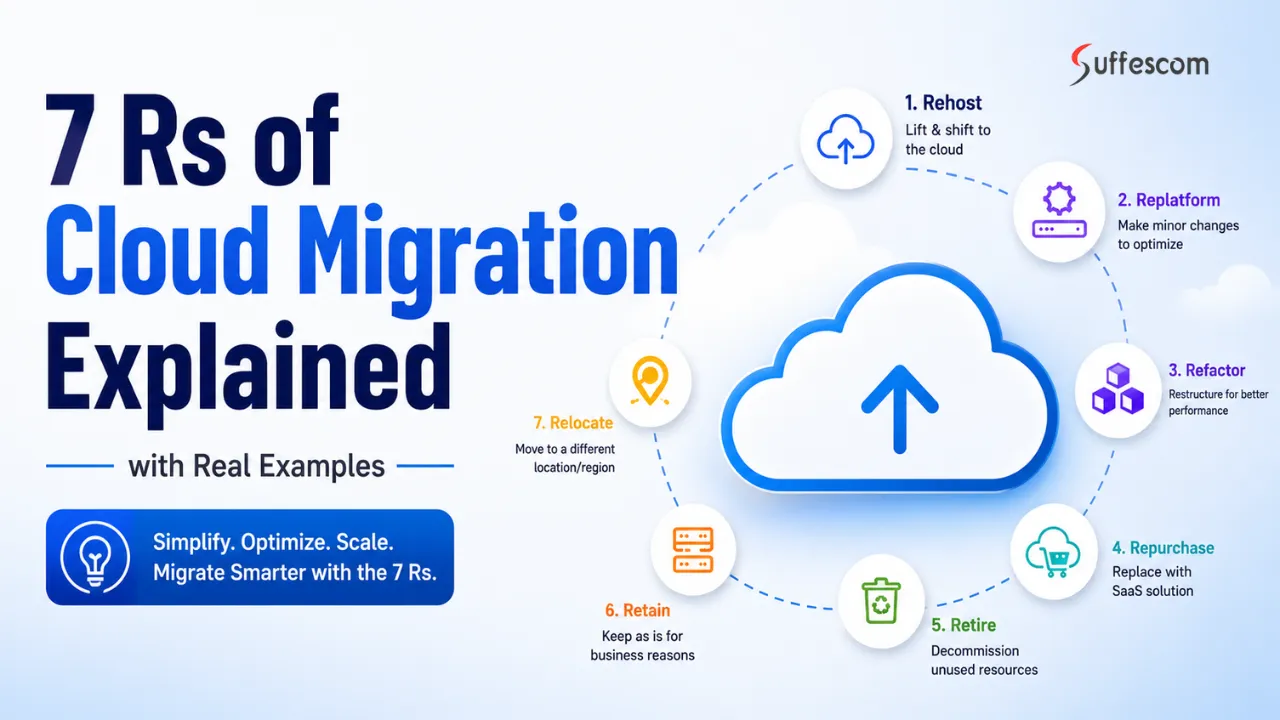
There’s the 7 Rs of Cloud Migration framework, which gives a methodical way to look at apps, tasks, and infrastructures before heading to the cloud. Instead of following one fixed plan, this framework lets businesses pick the best move based on their goals, technical needs, rules they have to follow, and money stuff. They sort their work into seven paths: Rehost, Replatform, Refactor, Repurchase, Relocate, Retain, and Retire. Doing this lowers risks and gets them the most out of their cloud cash.
A solid cloud strategy is super important nowadays. According to Gartner, we’ll see $723.4 billion spent on public clouds in 2025. Plus, by 2027, 90% of businesses will use hybrid cloud setups. So, using the cloud isn’t just an option anymore – it’s essential for running any company today.
Why Businesses Need a Cloud Migration Framework
Many cloud migration projects fail because companies focus on shifting workloads without linking those moves to overall business goals. When firms lack a strong plan, they run into all sorts of headaches—unexpected expenses, app slowdowns, security threats, and messy interruptions.
A proper cloud migration framework acts as a guide. It helps evaluate current setups and pick the right move for each app. For IT bosses, this means figuring out what workloads matter most, spotting tech ties, seeing what rules must be followed, and drawing up doable schedules. In turn, this cuts down on pricey flubs and keeps resource use on point.
Poor planning is still a huge issue, according to studies. Gartner reports that 25% agencies will feel let down by their cloud push by 2028. Issues arise from too-rosy forecasts, weak launch strategies, and spending getting out of control. Companies that start with a crisp cloud direction do much better.
How the 7 Rs Help Reduce Cloud Migration Risks
Improving security and compliance management is super crucial during cloud migration. The framework lets organisations figure out what apps can migrate safely and what needs to stay put on-premises because of strict compliance requirements. This is a game-changer for sectors like healthcare, finance, and government where rules about data are really tight. Following a well-structured plan protects sensitive info, boosts governance, and keeps everything legal according to their industry’s rules too.
Minimising Downtime During Cloud Migration
Reducing downtime during cloud migration is super important because unplanned downtime can really hit revenue, customer happiness, and overall business ops. The 7 Rs framework helps firms keep things running smoothly by figuring out which move works best for each app. Take Rehosting for instance, it gets apps over with quick and minimal tweaks. Then there’s Relocating VMware, which lessens infra migration complexity. By wisely looking at app dependencies and set times, firms can keep operations going and dodge pricey interruptions.
Improving Security and Compliance Management
Cloud migration is a deal and security is a major concern. When you move to the cloud you have to think about which applications are safe to move and which ones should stay where they are because of rules and regulations. This is really important for places like hospitals and banks and government offices where people have to be very careful with information.
Having a plan for cloud migration helps keep important information safe, makes sure the right people are in charge and helps follow the rules that different industries have to follow during the whole migration process. The cloud migration plan is about security and regulatory compliance so you have to think about cloud migration and security all the time.
Optimising Cloud Migration Costs
Controlling cloud migration costs is another big issue in cloud migration. Lots of companies underestimate how much it’ll all end up costing, ending in going over budget and getting less ROI than expected. With the 7 Rs framework, they can decide what to retire, retain, or update to avoid needless migration. Checking the value and tech worth of each app means less redundancy, lower infrastructure costs, and smarter resource allocation. So this method stops extra spending while still backing cost optimisation in the long run.
Enhancing Workload Performance and Reliability
Different apps need different performance stuff, and moving them without checking first can mess things up. The 7 Rs framework helps match workloads with the best migration plan to boost performance and reliability. For instance, refactoring apps to cloud-native can make them scale better and respond quicker. Replatforming can also boost efficiency with managed cloud services. Picking the right path delivers improved app performance, makes systems more reliable, and gives users a smoother experience.
Key Benefits of Choosing the Right Cloud Migration Approach
Picking the correct cloud migration strategy is important for getting the most out of using the cloud. Moving workloads isn’t enough; the proper plan helps cut costs, boost how you run operations, speed up bringing new creativity to market, and makes your systems tougher. The 7 Rs framework gives you the room to match your cloud moves with your goals, helping each workload add to bigger digital revamps.
Accelerated Digital Transformation and Innovation
Having a solid cloud migration plan sets the stage for coming up with fresh ideas. It lets you use cloud-born tech, automating gear, AI, and fancy data analysis tools. When firms choose refactoring or replatforming, they can revamp old apps and speed up getting modern services up and running. This lets them react quicker to what customers want, roll out stuff faster, and stay ahead in changing markets. So, it doesn’t just make your processes slicker; it drives you forward in new directions too.
Greater Scalability and Business Agility
One major perk of cloud computing is its ability to adjust resources based on what your biz needs. The right migration approach means you get to make the most of cloud flexibility. Your infrastructure and apps can grow or shrink with demand, boosting how you react to market shifts, supporting growth, and making ops way more nimble.
Reduced Infrastructure and Operational Costs
Another huge benefit? Saving dough on infra and ops costs. Keeping old on-prem gear going is pricey and time-consuming. With a solid cloud move plan, you can cut down on hardware, slash maintenance fees, and get better resource use too. Options like swapping old apps for Saas versions or dumping stuff that’s outdated will lower running costs and boost efficiency across the board.
Improved Disaster Recovery and Business Continuity
In the cloud world you can count on things to keep working because the system is set up in many places so if one place has a problem the other places can take over. The right choice when moving to the cloud helps organisations get better at dealing with problems and reduces the time that things are not working. Good cloud recovery solutions help the cloud keep things running, keep important information safe and help the cloud get back to normal faster after something bad happens or after cyber attacks on the cloud. The cloud recovery solutions are important for the cloud. The cloud needs these cloud recovery solutions to keep the cloud safe and the cloud running.
Better Return on Cloud Investment (ROI)
Cloud migration is a deal and it costs a lot of money so we need to get as much out of it as we can. The 7 Rs framework is really helpful for companies to figure out which things to do first based on what’s most important to the business. This way companies can put their money where it will make the difference. When companies move to the cloud they can do things efficiently, save money, work better and grow more easily. This means that cloud migration can be a good investment for businesses and they can get a lot back from the money they spend on cloud transformation. Cloud migration is a project but with the right plan companies can make the most of it and get a strong return on their investment from their cloud transformation efforts.
Future-Proofing Enterprise IT Infrastructure
Technology is changing fast and companies need systems that can handle new ideas. The best way to move to the cloud is to have a plan that lets businesses create a system that’s easy to change and up to date. This system can use things like artificial intelligence and machine learning. It can also use automation. Look at lots of data to make good decisions. If companies update their systems now they can grow for a time and stay competitive in a world that is becoming more digital. This is very important for cloud migration. It is good for the companies that do it. Cloud migration is a deal and it can help companies do well in the future.
Modernize Legacy Applications Faster
Transform outdated systems into cloud-ready solutions built for long-term growth and performance.
What Are the 7 Rs of Cloud Migration?
The 7 Rs of Cloud Migration are a plan that helps people figure out how to move workloads to the cloud. This plan is used to look at applications and decide what is the way to do it. The 7 Rs of Cloud Migration do not say to use the way for every single thing in the computer system. Instead the 7 Rs of Cloud Migration help companies pick the way to do it based on what they want to achieve with their business, how hard it is to do from a technical point of view, what rules they have to follow and how much it will cost. The 7 Rs of Cloud Migration are very useful for this.
Understanding the Origin of the 7 Rs Framework
The 7 Rs framework came from ways of moving things to the cloud. This was done to make it easier to update applications and use the cloud. The problem was that different jobs need to be done in different ways. So the 7 Rs framework was made. It has seven ways to do things: Rehost, Replatform, Refactor, Repurchase Relocate, Retain and Retire. The 7 Rs framework helps organisations have problems when they move to the cloud. It also helps them save money on cloud costs and work better. The 7 Rs framework supports organisations when they want to change and update their technology for the term. The 7 Rs framework is, about the 7 Rs: Rehost, Replatform, Refactor, Repurchase Relocate, Retain and Retire.
How AWS, Azure, and Google Cloud Use the 7 Rs Model
Big companies that provide cloud services like AWS, Microsoft Azure and Google Cloud use something called the 7 Rs framework when they help people move to the cloud. These companies use this framework to help people figure out what they need to do, decide which things are most important and make a plan for moving to the cloud. The 7 Rs framework helps people choose the way to move each part of their business to the cloud. When people use the 7 Rs framework to move to the cloud they can make their cloud services work better, make them more secure and make sure that things do not get messed up. This way the cloud services can be an investment for people and help them get the most out of moving to the cloud with the 7 Rs framework.
Table: Overview of the 7 Rs of Cloud Migration
| Migration Strategy | Definition | Complexity | Cost | Best For |
| Rehost | Lift and Shift | Low | Low | Fast migrations |
| Replatform | Lift, Tinker & Shift | Medium | Medium | Application optimisation |
| Refactor | Re-architect applications | High | High | Cloud-native transformation |
| Repurchase | Replace with SaaS | Medium | Medium | Legacy software replacement |
| Relocate | Hypervisor-level migration | Low | Medium | VMware workloads |
| Retain | Keep on-premises | Low | Low | Compliance-sensitive apps |
| Retire | Decommission applications | Low | Savings | Unused systems |
R1
Rehost (Lift and Shift) Migration Strategy Explained
Rehosting is a way to move things to the cloud. People also call it Lift and Shift Migration. This is one of the ways to do it. You take an application or a server. Move it from your own place to a cloud platform. You do not have to make a lot of changes to how it works.
This is often the thing people do when they want to use the cloud. It helps companies move fast and stop using equipment. They can then use the things about the cloud without having to do a lot of work. For companies that want to start using the cloud and do not want to disrupt things, rehosting is a good place to start. Companies can just move their applications to the cloud. Keep on working as they did before. Rehosting is a way for companies to start using the cloud.
What Is Rehosting in Cloud Migration?
Rehosting is a way to move applications to the cloud without making changes. The code and how the application works stay much the same. Companies basically copy their system and put it in a cloud service like AWS, Azure or Google Cloud.
This is really helpful for companies with a lot of applications that would be hard or expensive to change. By waiting a long time to move to the cloud they can do it quickly and worry about making it better later.
Rehosting is like moving a house to a place but you do not change the way the house is laid out. The house is still the same it is just, in a location that gives you more freedom to make changes later. You can think of rehosting as a way to get your applications into the cloud and then you can make improvements to the applications later.
Real Example of Rehosting a Legacy Enterprise Application
A financial services company has a customer management system that runs on servers in its own data centre. This system is very stable. It supports the main business operations. The company has made a lot of changes to this system over the years. However the equipment that supports this system is getting very expensive to take care of. Some of the hardware needs to be upgraded.
The company does not want to build the system from scratch. So it chooses to use a Rehost strategy. This means the virtual machines that run the system are moved directly to a platform like AWS. The system works in the way as before but now the company does not have to worry about the physical equipment taking care of the servers or the costs of the data centre.
This way the company can move the system to the cloud in a few weeks instead of a few months. It also reduces the costs of the equipment. Makes the system more safe, in case something goes wrong. Once the system is running well in the cloud the company can look at ways to make it even better such as using managed databases or cloud services that are available.
Advantages and Limitations of Lift-and-Shift Cloud Migration
The biggest advantage of rehosting is that it is really fast. Since the applications do not need a lot of changes people can move them to the cloud faster than with other methods. This makes rehosting a choice for companies that need to close their data centres, update their hardware or move to the cloud quickly.
Rehosting is also a way to make the migration process less complicated and it does not cost as much to start. Companies can start using the benefits of the cloud such as being able to handle work, being more reliable and having access to a global network without having to spend a lot of money to redesign everything.
However just lifting and shifting the applications to the cloud is not always the way to do things in the long run. This is because the applications are not designed to take advantage of the cloud so they might not be able to use things like automatically adding more power when it is needed or services that are managed by the cloud provider. As a result companies might miss out on chances to make their applications work better and cost less to run.
For this reason a lot of experts think that rehosting is the first step. It lets companies move to the cloud quickly and sets them up to make changes in the future. When companies use rehosting and also have a plan to make the most of the cloud in the run they can get benefits right away and also be on a path to making big changes to how they use technology. Rehosting and cloud migration go hand in hand with rehosting and experts see rehosting as a way to start the process of cloud migration and rehosting.
Expert Insight
Rehosting is usually used when you need things to happen quickly. When one wants to reduce the risks and make sure your business keeps running smoothly. Companies should look at each application one by one instead of just moving everything over to the new system all at once. Some applications are really important to the company so it might be better to replatform. Refactor them after they have been moved because that could bring in more money and benefits in the long run, for the company and its business.
R2
Replatform Migration Strategy: Optimising Applications for the Cloud
Replatforming is a way to move things to the cloud that’s not too simple and not too hard. People call it “Lift, Tinker and Shift”. This means we make some changes to an application that really help before we move it to the cloud. The main application stays the same. We make some parts better so they work well with cloud services. This makes the application work better, scale better and be easier to run.
For companies, replatforming is a good choice because it is not too fast and not too slow. It lets businesses update some parts of an application without taking much time, money and effort like they would if they had to rebuild everything from scratch. Replatforming is an option because it gives companies the benefits of the cloud without having to do too much work. Companies can use replatforming to make their applications and it helps them get ready for the cloud.
What Is Replatforming?
Replatforming refers to moving an application to the cloud and making some changes to make it work better and be easier to manage. This is different from Rehosting, where you move an application to the cloud without making changes. With Replatforming you make some small improvements to help the application work better in the cloud.
These improvements can include moving databases to cloud services that manage themselves using cloud services or managing things yourself or making it so the application can automatically adjust to how much work it needs to do.. The main parts of the application and what it does stay pretty much the same.
Think of Replatforming like fixing up a house before you move in. The house is still the same. You make some important changes to make it more comfortable, efficient and worth more in the long run. You do this with Replatforming you make some changes to the application to make it better. It is still the same application. Replatforming is about making these small changes to help the application work better in the cloud.
Real Example of Moving a Database to Managed Cloud Services
Imagine a company that sells things online and has its website on servers. This company also has a database that it manages itself which is located at its office. The website works fine. The company has to use a lot of its computer people to take care of the database. They have to make sure the database is backed up, update the software, fix security problems and make sure it is working well.
Of starting over with the website the company decides to use a Replatform strategy. This means the website is moved to the cloud, which’s like a big computer system on the internet. The database is also moved to a service that manages it like Amazon RDS, Azure SQL Database or Google Cloud SQL.
The website still works the way, for the people who use it but the company no longer has to take care of the database itself. The cloud service does things like automatically back up the database, keep it secure, make sure it is always available and check to see if it is working well.
The company benefits from this change because it does not have to spend a lot of time taking care of the database. The website is more reliable and handles more users without the company having to spend a lot of money to redesign the whole website. The e-commerce company reduces its overhead, improves reliability and gains better scalability without having to invest in a costly application redesign of the e-commerce company’s website.
When Businesses Should Choose Replatforming
When companies want to get more out of using the cloud without doing a project to update all their applications, replatforming is often the way to go. This works well for applications that are already working fine and are important to the business but could be improved in terms of how fast they work, how well they can handle a lot of users or how much it costs to keep them running.
Companies should think about replatforming when they want to:
- Reduce the amount of work it takes to manage their infrastructure and handle tasks.
- Make their applications work better and be more reliable.
- Use cloud services that are managed by someone
- Spend money on operations over time.
- Move their applications to the cloud faster without having to rebuild them.
- Get their workloads for when they can be updated to be more modern and work well in the cloud.
Replatforming is really useful for companies that have already found problems with their infrastructure but are not ready to put in the time and money to completely redo everything. It gives them a middle ground between getting things done quickly and making sure everything is working as well as it can. This way companies can get benefits from using the cloud while keeping the risks of moving to the cloud relatively low. Replatforming is a choice for companies that want to make the most of cloud adoption and replatforming can help them do that.
Expert Insight
One of the mistakes companies make is moving their applications to the cloud without using the special services the cloud offers. This is where replatforming comes in. It helps fix this problem by making changes that make a big difference right away. For big companies this is the best way to move to the cloud because it gets things done quickly and makes sure everything is working well which makes it easier to make more changes to the cloud later on. The cloud is a tool and replatforming is a good way to use it. Many companies are using the cloud. They are finding that replatforming is a good way to get the most out of it. The cloud and replatforming are a team.
R3
Refactor (Re-Architect) Applications for Cloud-Native Performance
Refactoring is a change for companies. It is also called Re-Architecting. This is the change you can make when you move to the cloud. It is part of the 7 Rs framework. It is different from Rehosting or Replatforming. Those two just move what you already have to the cloud. They do not make changes. Refactoring is when you make applications that use the cloud in a big way. Companies choose Refactoring when they want to be able to grow and make things for a long time. They also want to be better than companies.
It takes a lot of time and money to do Refactoring.. It is worth it. When you refactor you can make your applications work better and be more flexible. You can also make your business run smoothly. This is how you can really use the cloud to make your business better. Refactoring helps you do this.
What Is Cloud Application Refactoring?
Cloud application refactoring is when you change an application to work better with cloud services and new ways of developing things. Of just moving an application to the cloud companies redesign it to work really well in cloud environments.
This usually means breaking up applications into smaller parts that can work on their own using things like containers making deployment automatic and using cloud services that are managed.
Cloud application refactoring is like taking an office and turning it into a new smart office. The reason you have an office is still the same. You change the way it is set up to make it work better, be more flexible and be ready for the future. Cloud application refactoring is really helpful, for applications that have trouble handling a lot of users need to be updated all the time or stop companies from coming up with new ideas.
Real Example of Microservices-Based Application Modernisation
A big online store has a website that does a lot of things. It shows what products are for sale, takes payments, keeps track of what’s in stock, handles customer accounts and manages orders all in one place.
When a lot of people shop at the time the website gets slow. If the company wishes to make a change they have to update the whole website, which takes a long time and can cause problems.
To make things better the company decides to break up the website into smaller parts. They call this a Refactor strategy. The smaller parts are, like teams, each doing one job. Product management, payments, inventory and customer accounts all work separately and can talk to each other.
When they put these parts on the internet each one can grow or shrink as needed. For example when there is a sale the payment part can handle more work without slowing down the other parts. This makes the website work better, crash less and lets the company add features faster.
Benefits of Refactoring for Scalability and Innovation
The best thing about cloud refactoring is that it lets you use all the things that cloud services can do. This makes applications more flexible and easier to take care of so companies can change things quickly when their business needs change.
Key benefits include:
- Cloud services can grow to meet your needs
- You can. Put out new software faster.
- Your application will work better. Be nicer for users.
- If something goes wrong the system can keep working because it has parts.
- It is easier to use intelligence and other services with your application.
- You can put out products and features faster.
When you refactor your applications they are ready for the future so you can use technologies without being held back by old systems.
Challenges and Costs of Cloud Refactoring
Refactoring is a deal because it can bring a lot of good things in the long run. However it is also the most expensive way to move things to the cloud. When we redesign applications we need to plan a lot, have developers know about architecture and test everything before we can use it.
Common challenges include:
- The cost of moving to the cloud is high at first.
- It takes a long time to finish the project compared to other ways of moving to the cloud.
- The business might be affected while we are working on it.
- We need people who know how to develop cloud-native applications.
- It is hard to update systems that have been changed a lot.
Companies need to think about whether the good things they will get from refactoring are worth the cost. For applications that’re very important to the business like the ones that affect what customers think of us, how much money we make or how we are different from others, the good things we get in the long run are often more important than the costs we have to pay at first. Refactoring these applications can bring a lot of benefits and the long-term benefits of refactoring often make it worth the investment in refactoring.
Expert Insight
Many organisations think that every application needs to be changed when it is moved to the cloud.. The truth is that the people who design the cloud usually only do this for the applications that are really important and need to be able to handle more work, come up with new ideas faster or use the special things the cloud can do. The cloud migration programmes that work the best are the ones that use Refactoring and other ways of moving applications to the cloud. This way each application is moved in the way that’s best, for the business and does not cost too much. The organisations do this to get the value from the cloud. They use cloud migration programmes to move the applications to the cloud.
R4
Repurchase Strategy: Replacing Legacy Systems with SaaS Applications
Repurchasing is a way to move things to the cloud. It means getting rid of an application and using a new one that is based in the cloud. This new application is a service that people can use over the internet. By trying to fix the old system or make it work better companies just start using a new cloud application that does the same things or even more.
This is what companies do when their old software is too expensive to keep running, does not have the features they need or is not helping their business grow. By using a service businesses do not have to worry about managing computers and servers they get updates automatically and they can use new features without having to rebuild their application. Repurchasing a service like this can be a good option for companies that want to use Software as a Service or SaaS, for short to make their lives easier.
What Does Repurchasing Mean in Cloud Migration?
Repurchasing is when a company stops using an application and buys a new one that is based in the cloud. This new application is better for what the company needs. It is different from Rehosting, Replatforming or Refactoring because the old application is not moved to the cloud. Instead it is completely replaced by a SaaS solution that someone else manages.
This is something that a lot of companies do for things like customer relationship management, which is also called CRM, human resources, accounting and working together as a team. They also do it for enterprise resource planning, which is also called ERP.
Repurchasing is like getting a car for the company instead of keeping the old one and trying to fix it all the time. At first it might take some time to get used to the car but then the company will have a car that works better and needs less maintenance. The company will also have features that the old car did not have.
Real Example of Migrating from On-Prem CRM to SaaS
Imagine a company that is getting bigger and using a customer relationship management system that’s on their own computers. This system needs machines, regular updates and people from the company to take care of it all the time. As the company gets bigger the people who work there have a time getting to the system from outside the office. The system is old and it costs a lot to keep it running.
The company decides not to make the old system better, instead they choose to use a customer relationship management system that is online. They move all the customer information, sales numbers, work plans and user accounts to the online system and get rid of the old one.
After the move the people who work for the company can get customer information from anywhere. They do not have to worry about updating the system because it happens automatically. The company also does not have to take care of the machines and equipment that the system runs on. This makes the company work better, saves money on taking care of the system and gives them access to things, like automatic work, reports and smart ideas that come from computers.
Popular SaaS Platforms Used During Cloud Modernisation
Organisations use SaaS apps in their cloud upgrade plans because these tools provide top-notch features without the hassle of handling software and infrastructure in-house.
Some widely adopted SaaS platforms include:
- Salesforce for customer relationship management.
- Microsoft Dynamics 365 for CRM and ERP functions.
- SAP S/4HANA Cloud for enterprise resource planning.
- Workday for HR and workforce management.
- ServiceNow for IT service management and business process automation.
- Google Workspace and Microsoft 365 for communication and workplace collaboration.
These platforms are picked based on what the business needs, legal rules, how well they integrate, scalability goals, and overall cost.
Expert Insight
Often, repurchasing gets overlooked during cloud migration planning as organisations focus on moving existing apps. But buying new SaaS solutions can sometimes work better than fixing old systems. It could offer quicker results, lower hidden cloud migration costs, and more business value. Before diving into app modernisation, companies ought to check if a good SaaS option can do the job better while still helping them grow and innovate in the future.
R5
Relocate Cloud Migration Strategy Explained
Relocation moves whole virtualised environments from physical locations to the cloud, keeping the basic setup intact. It differs from Rehost or Refactor because it shifts hefty VM workloads—usually through hypervisor tech like VMware—directly into the cloud.
This works great for big companies with complex data centers aiming for quick cloud transitions. They don’t have to figure out app redesigns or disturb current systems. This way, businesses stick to what they know while tapping into the flexibility, scale, and reliability that the cloud offers.
What Is Relocation in Cloud Migration?
Cloud migration is when we move things from our place to the cloud. We take the work that is already set up and move it to the cloud. The things that are running inside these setups do not change. We use tools to make this move happen. These tools copy everything the way it is.
Some companies like to do this when they have a lot of things already set up with VMware.
They have setups that they want to move to the cloud. By changing each thing one by one they move everything at the same time. They move it to a cloud that can handle the kind of setup.
Think of it like moving a building to a new place. Cloud migration is like relocation. Everything inside the building stays the same. The building itself is now in a better place. It is like getting a better house but all your things are still in the same place. The new house is easier to take care of and you can grow if you need it to. Cloud migration is like that, it makes things better and easier to manage.
Real Example of VMware Workload Migration
A big company that makes things around the world has a lot of virtual machines running on its own VMware system. These virtual machines are important for things like managing supplies, scheduling production and helping people inside the company talk to each other.
It is getting very expensive to take care of the data centre. The company wants to use hardware and be better prepared for disasters.. If they had to change each application one by one it would take a very long time. So the company decides to use a Relocate plan with tools that help move VMware to the cloud. They move groups of virtual machines from their own data centre to a cloud system like VMware Cloud, on AWS.
After everything is moved the applications keep running just like they did before but now the company has a system that can handle problems, makes backups automatically and needs less work to keep the hardware running. This helps the company move to the cloud faster. Does not disrupt the important work they do every day.
Benefits of Relocating Enterprise Infrastructure to the Cloud
Relocation gives big companies with tricky IT setups some nice benefits. For one, it’s super fast. Apps stay the same, so moving bulk workloads to the cloud happens quicker than old-fashioned modernisation methods. This is perfect for firms wanting to leave data centers fast and save on infra costs without holding up their ops.
Plus, risk drops since systems don’t change. So apps won’t fail or have compat issues when moved. This is great for keeping everything running smoothly, especially for critical tasks.
Another perk? Cloud infra lets you use flexible resources, better backup choices, and boost uptime, all without tweaking your code. And hey, you cut costs on gear and data center upkeep. Plus, you shift to a steady op-ex model, making budgeting way easier.
Expert Insight
Organisations with big VMware setups usually opt for relocation since it lets them move their whole data center to the cloud with minimal fuss. While this option offers speed and stability, it doesn’t fully modernise apps. So, many firms use it just initially, eventually moving on to more advanced tactics like replatforming or refactoring. This allows them to ultimately get those enhanced cloud benefits.
R6
Retain Strategy: When Keeping Applications On-Premises Makes Sense
The Retain strategy in the 7 Rs of Cloud Migration means keeping certain apps or systems on-premises instead of moving them to the cloud. Even though cloud use is growing, some workloads just aren’t meant for the cloud. Actually, many orgs keep certain systems on-site for a secure and balanced strategy.
Businesses may opt to retain apps that are tied to old infra, need super low latency, or have to follow strict rules. It helps them avoid extra risks and costs by thinking through what belongs in the cloud and what doesn’t.
Compliance, Security, and Technical Reasons to Retain Workloads
Organisations opt to keep some workloads on-premises for several crucial reasons. First, there’s regulatory compliance. Banking, health care, and governmental sectors must store sensitive info within specific locations due to strict data laws.
Security issues also play a big role. Many firms store their ultra-sensitive stuff in their own data centers for maximum control. It lets them handle finance data, secret nation info, and private individual details safely and as needed.
Plus, technical problems might make switching to the cloud tough. Old apps can depend on ancient tech that’s tricky and pricey to update for cloud use. Moving might cause more headaches than it solves sometimes.
It’s like holding onto vital papers and keeping them in a trusty, locked safe rather than risking it in an unfamiliar storage area where all the “lock tight” rules aren’t always followed.
Real Example of Retaining Sensitive Financial Systems
A big banking company runs a core transaction system handling millions of daily financial tasks. This system is woven into old infrastructure and has to follow strict rules set by financial regulators.
Though the organisation uses cloud services for other jobs, they keep the core system on-site. Why? It needs very low latency, full audit control, and guaranteed compliance with national finance rules.
Rather than moving the app to the cloud, the bank keeps it running in a secure private data center. At the same time, they shift less sensitive stuff, like customer support websites and analytics tools, to the cloud.
This careful approach lets them upgrade bit by bit while keeping security, performance, and regulatory needs intact.
Hybrid Cloud Migration Scenarios
The Retain strategy is important for a hybrid cloud architecture. This is when companies use both their systems and cloud systems at the same time. A lot of the time companies do not move everything to the cloud away. They use a mix of both so they can be flexible and still be in control.
In a setup companies keep important work on their own systems. They move things to the cloud. This way companies can make things work better, save money and follow the rules. They can also use the things about the cloud like being able to grow and get new ideas.
Hybrid cloud environments also help companies move things to the cloud slowly. Companies can update their applications over time. They can move things to the cloud when they are ready rather than having to do it all at once. This is good for the Retain strategy and for hybrid cloud architecture.
Expert Insight
The Retain strategy is often misunderstood. People think it means not using the cloud all.. That is not true. It is actually a decision that makes sure workloads are in the best place.
A good plan for moving to the cloud is not about putting everything on the cloud. It is about finding the mix of cloud and on-premises systems. This mix should meet the needs of the business, keep things secure and follow the rules that’re in place. The Retain strategy is about finding this balance and making sure the cloud and on-premises systems work well together to meet business, security and regulatory requirements.
R7
Retire Strategy: Eliminating Unnecessary Applications
The Retire strategy in the 7 Rs of Cloud Migration is about finding and getting rid of applications that’re not useful or relevant anymore. A lot of companies have a problem with old systems and tools that they do not use much. These systems take up a lot of space and resources.
The Retire strategy says that companies should not move all their systems to the cloud. Instead they should look at all their applications. Get rid of the ones that are not doing anything good for the business. This makes things simpler. Means that companies only move the important workloads to the cloud. The Retire strategy, in the 7 Rs of Cloud Migration helps companies to focus on what’s really important.
How Application Rationalisation Reduces IT Costs
Application rationalisation means checking out all the software in an organisation to spot extra, old stuff that doesn’t really help much. By sorting apps based on how much they’re used, their business benefit, and the cost involved, the company can decide which ones to keep, swap out, or get rid of.
Cutting back on unneeded apps saves money in IT too. You slash those software licenses, cut infra costs, and have your IT folk focus on other important tasks, not just upkeep. Plus, streamlining security gets easier since there are fewer systems that need updates and checks.
At big firms, lots of tools often do the same jobs. So trimming the fat lets them use resources smarter and boost overall efficiency.
Real Example of Retiring Legacy Software
In a multinational company grown via mergers and acquisitions, various internal communication tools sprang up—outdated messaging platforms, old-fashioned intranet systems, and extra collaboration apps. But after checking everything out, the IT team found these solutions lying unused, while staff already stuck with a newer cloud-based system.
So, instead of lugging those legacy platforms to the cloud, the smart decision was made to scrap them entirely. They shut down the obsolete apps, stored data following all the rules, and kept only the current collaboration tool online. Because of this move, the firm cut costs, made life easier for their tech operators, and left employees happier too. Without the jumble of redundant systems around, finding what they need is more straightforward now.
Business Benefits of Application Retirement
Cutting out unnecessary apps gives businesses more than just cheaper bills; it simplifies operations too. With fewer systems hanging around, IT folks can ditch maintenance duties for old tools and focus on key apps and big digital projects instead.
This move also ramps up performance and makes things way more secure. When there are less apps running, there’s a smaller chance of hitting vulnerabilities, meaning cyber crooks have less ways in. This strengthens an organisation’s safety measures and streamlines following rules and regs.
Plus, it helps when it comes to making decisions. Clearing out extra systems means seeing the tech woods more clearly, which aids planning for those all-important cloud moves and digital revamps.
Expert Insight
The Retire strategy is usually ignored in cloud migration plans, even though it can save costs super fast. Many enterprises have apps that aren’t even used anymore—up to 20-30%. Finding and getting rid of them early makes the whole migration more focused and efficient. It keeps cloud transformation lined up with actual business needs too.
Comparing the 7 Rs of Cloud Migration
Table: Which Cloud Migration Strategy Should You Choose?
| Business Goal | Recommended Strategy |
| Quick Migration | Rehost |
| Lower Infrastructure Costs | Replatform |
| Digital Transformation | Refactor |
| Replace Legacy Software | Repurchase |
| VMware Cloud Move | Relocate |
| Regulatory Compliance | Retain |
| Reduce IT Complexity | Retire |
Cloud Migration Assessment Checklist for Enterprises
Before you move any application to the cloud you need to think about what you’re doing. You need to make a list of things to check so you do not make mistakes. This list helps you pick the way to move your applications from the options you have which are the 7 Rs model. It makes sure that you really understand what each application does before you do anything to it.
This step is not about technology, it is about making good business decisions. You have to think about how it works, how safe it is, how much it costs and what it will be like, in the long run.
Application Dependency Analysis
Application dependency analysis is about knowing what other systems an application needs to work. A lot of company applications do not work alone. They connect with databases, APIs, payment systems or tools, inside the company.
For example a payroll system needs HR software, tax calculation services and employee databases to work. If you move one part to the cloud without thinking about these connections it can stop the workflow from working.
By making a map of what depends on what companies can figure out if they should move everything to the cloud at the time, do it in steps or keep some systems in their own buildings. This makes it less likely that the application will be down and makes planning to move to the cloud a lot easier. Application dependency analysis helps with this by showing what systems rely on systems like the payroll system relies on the HR software and the employee databases.
Security and Compliance Review
A security and compliance review is really important when you are moving an application to the cloud. This is because it checks if the application meets all the rules and standards for security.
For example if you are a hospital you have to make sure you are following the law when it comes to records. In the UK and Europe there are laws like the GDPR that you have to follow.
Before you move your system to the cloud you need to make sure that the cloud is safe and secure. This means it needs to have encryption, access control and it needs to follow the rules for storing data. This review helps companies decide what to do with their applications. They can choose to move them to the cloud, change them or keep them as they are depending on how much risk’s involved and what the rules say.
Cost and ROI Evaluation
The cost and the return on investment evaluation helps businesses figure out if moving an application to the cloud is really going to save them money.
This means looking at what they’re spending now to run things on their own servers and comparing that to what they will have to pay for things like storage and computing power when they move to the cloud.
For example a company that is using a customer relationship management system on their own servers might be spending a lot of money on keeping the hardware running and paying for licenses.
If they move to a cloud-based system they might be able to cut back on these costs. Only if they make sure they are using the cloud in a smart way. The cost and the return on investment evaluation makes sure that the decision to move to the cloud is an one, for the business and that it fits with what they want to achieve in the long term not just something they are doing because it is popular right now.
Cloud Readiness Assessment
Cloud readiness assessment is a way to figure out if an application can work well in the cloud. The thing is, some old systems are not good to go in the cloud without some changes.. The new ones might be ready to move right away.
For example let us say we have a legacy accounting system that’s 15 years old. This system may need some work before it can run in the cloud. On the other hand , a new web application might be ready to move to the cloud with very little work.
This step is important for organisations to decide what to do with their applications. They need to think about whether to move the application to the cloud as it’s make some changes to the application to work in the cloud make big changes to the application to take advantage of the cloud or just leave the application as it is based on what is technically possible, with the cloud readiness assessment of the application.
Turn Cloud Migration Into a Business Advantage
Align cloud decisions with revenue growth, operational efficiency, compliance, and long-term scalability goals.
Common Cloud Migration Challenges and How to Overcome Them
Cloud migration has a lot of benefits like being able to scale up or down saving money and coming up with ideas faster.. Companies often run into problems when they are moving to the cloud. If they know about these problems they can plan better and use the right approach from the 7 Rs framework. This helps them avoid issues and failures.
Below are the most common cloud migration challenges and practical ways to overcome them:
Unexpected Cloud Migration Costs
One problem with cloud migration is that it can cost more than you think. A lot of companies think that moving to the cloud will automatically save them money.. If they do not plan carefully they can end up with bigger bills than they expected.
For example a company might move its applications to the cloud without making sure they are using storage and computing power in the way. Over time this can lead to cloud costs because of things like unused resources, configurations that are not efficient and constantly moving data around.
To avoid this problem companies should carefully look at the costs before they migrate to the cloud. They should also keep an eye on how they are using the cloud after they migrate. Using approaches like Replatform or Retire from the 7 Rs model can also help them get rid of workloads they do not need and save money. Cloud migration is something that companies need to think about to make sure they are using the cloud in the best way possible. Cloud migration can be a help to companies if they do it right.
Data Security and Governance Concerns
Security is a worry when you are dealing with important business or customer information. When you move this information to the cloud you have to think about things like people getting in without permission, things being set up wrong and not following the rules.
For example if a healthcare organisation is moving information to the cloud they have to make sure they are following the rules of GDPR and they have to be very careful about who can see this information so they do not have any problems with people getting in without permission.
To deal with these worries organisations should use locks on their information, have a good system for managing who can get in and see what and they should regularly check to make sure they are following all the rules. Choosing the way to move this information like using something called Retain for very sensitive systems can also help them keep control over the most important information. Security and governance of this information is very important to these organisations.
Downtime and Business Continuity Risks
Downtime during migrations can mess up business operations, harm the customer experience and cost you money. This usually happens when the planning is poor or details about dependencies are unclear.
For example moving an e-commerce site without checking payment gateways could kill sales during a short outage. To stay, organisations should use multi-phase migrations. They should also run tests.
Applying methods like Rehost can help. This approach enables safer swaps. Having backup and disaster recovery plans in place before migrating helps to ensure a transition.
Skills Gaps During Cloud Transformation
Many companies have a time finding people who really know about cloud platforms and new ways of building things. When you move to the cloud you need to know about things like taking care of the basics, keeping everything using DevOps and building things that are meant for the cloud.
For example a team that is used to working with systems that’re right there in the office might have a tough time managing things in the cloud after they make the switch.
To make this easier, companies should put money into teaching their people skills, hire people who are experts in the cloud or work with people who have done this before. Using services that take care of the cloud for you can also help, because then you do not need to have a lot of know-how in house. Cloud migration is something that companies like these need to think about and cloud platforms are a part of that.
How to Select the Best Cloud Migration Strategy for Your Business
Choosing the way to move to the cloud is not just about the technology. It is about planning for the future of the business. A lot of companies have trouble with adoption because they move too fast and do not really understand how the workload will behave, what it will cost and how it will affect the way they operate. The 7 Rs framework is helpful because it gives businesses a plan and helps them think about the cloud migration risks so they can put each application in the best place for it.
The reason this decision is so important is that moving to the cloud is not something you can easily undo. Once you have moved or updated your systems it can be very costly and disruptive to fix mistakes. That is why companies are starting to use a thoughtful approach to cloud migration, where they carefully assess what they need to do before they start, rather than just rushing in and doing it. Cloud migration is a deal and companies are taking a closer look at cloud migration and how it can affect their business. Cloud migration is something that needs to be done.
Factors to Consider Before Migrating Workloads
Before you choose a way to move your systems to a new place organisations should look at the business sides of each application. The technical side includes how complicated the system is, how it connects to things, how sensitive the data is and what kind of performance it needs. The business side includes how it affects the money the organisation makes, how much people need it, what rules it has to follow and what you think it will be like in the future.
For example a system that helps with customer analytics and is used by the marketing people might be better if it can handle a lot of users and has tools while an old payroll system that does the same thing every time might need to be stable and not changed too much. Also systems that are only used at times of the year like the ones used for retail promotions might need to be able to handle a lot of users during busy times but not so much when it is slow.
One thing that people often forget is that old systems can get harder to take care of over time; this is called application decay risk. If you see this happening you can decide if you want to make the system new again or just get rid of it. Organisations should look at application decay risk so they can make a good decision about what to do, with the application.
Choosing Between Rehost, Replatform, and Refactor
These three strategies make up the key choices for most cloud migrations.
Rehost works best when you need speed. It lets companies move apps fast and with minimal changes, yet it’s better seen as a quick fix, not the end goal.
Replatforming involves some smart upgrades. An example would be switching from self-managed databases to the cloud-managed ones. That lessens the workload and boosts dependability. Many firms think it’s a budget-friendly choice for big jobs.
Refactor is about making that major, long-term tech investment. With this, businesses can create cloud-native systems for better scaling and ongoing updates.
Lots of enterprises use something called “progressive modernisation.” They start by rehosting everything, then slowly optimise or revamp their most valuable systems when they spot areas where improvements could really drive results.
Industry-Specific Cloud Migration Recommendations
Different industries prioritise different outcomes from cloud migration. Financial services focus more on regulatory compliance and auditability rather than speed, making hybrid models and selective refactoring better choices. In retail, improving customer experience and managing peak loads matter most, so they use scalable architectures and replatforming a lot. Healthcare follows a cautious approach due to a focus on data governance and patient safety, which means using strong encryption and secure environments. For manufacturing, keeping operations running smoothly is top priority, hence they usually relocate or rehost first, then gradually optimise things.
Aligning Cloud Strategy with Business Value Streams
A more advanced way to migrate to the cloud involves aligning workloads with business value rather than just tech types. Organisations now often ask what business outcome an app supports instead of “what category is this application in?”
For example, revenue generators like e-commerce sites get priority over internal tools. This highlights areas where cloud spending makes the biggest difference.
It also makes tracking return on investment easier because firms can see how cloud costs connect to performance. Think faster transactions, efficient ops, or acquiring new customers.
Post-Migration Optimisation Strategy (Often Missed Step)
Lots of organisations think that cloud migration is all done once apps are moved over, but here’s the thing: the best cost savings and performance boosts come afterwards. After moving to the cloud, you’ve gotta keep optimising stuff by rightsizing resources, cutting out unused services, tweaking autoscaling policies, and using cost governance tools. If not, even a seemingly smooth move could spike those cloud bills.
For example, something transferred with Rehost might run fine at first, yet end up oversized and expensive down the line. So regular tuning keeps everything running smoothly and doesn’t burn a hole in your pocket.
Expert Insight
The best cloud migration strategies aren’t set plans, but flexible frameworks. Companies that keep reassessing their workloads do way better in the long run compared to those who see migration as a one-time task. The 7 Rs work great when paired with continuous oversight, performance tracking, and keeping things aligned with business goals. This ensures their cloud investments keep providing real value.
Cloud Migration Best Practices for 2026
By 2026 cloud migration will not just be about putting systems in the cloud it will also be about controlling costs and making sure it aligns with business goals. Companies in the United Kingdom and around the world are not just quickly moving to the cloud like they used to. Cloud migration is now about focusing on how to control and manage things, making sure everything is working well and thinking about the long term benefits of cloud migration.
To do cloud migration correctly using methods is very important. This will help minimise problems, make things work better and keep improving cloud migration over time.
Build a Migration Roadmap
A cloud migration roadmap is a plan that shows how to move applications to the cloud. This plan is like a list of things to do one by one. It helps companies avoid getting confused. Make sure everything works smoothly.
For example a company does not have to move all of its systems to the cloud at the time. It can start by moving things like tools that people inside the company use to make reports. Then it can move the things that customers use.
A good cloud migration roadmap includes looking at the applications making a map of how things are connected choosing a way to migrate, setting timelines and testing. It also says what will make the migration successful like saving money making things work better and keeping everything running. If a company does not have a cloud migration roadmap it can take a time to move to the cloud, it can cost more money than it should and things can go wrong with the technology.
Prioritise High-Value Applications
Not all applications are created equal when it comes to the value they bring to a business. So it makes sense to focus on the applications that bring value to the business. This way the company can see results from moving to the cloud right from the start.
For example if a company has a store that makes money it should be moved to the cloud before something like a system for managing documents that people inside the company use. The same thing goes for applications that people outside the company use. These should be moved to the cloud before tools that are not used very much.
This way of doing things helps companies get a return on their investment faster. It makes them feel more confident about moving to the cloud. Cloud migration helps companies make sure that the systems that are really important are planned, tested and running well before they are moved to the cloud.
Implement Continuous Cost Optimisation
People often make a mistake when they move to the cloud. They think that the cloud will automatically save them money.. The truth is, if you do not keep an eye on what you are spending your cloud costs can actually go up.
You need to keep checking how you are using the cloud and get rid of things you do not need. For example you should turn off machines that nobody is using. You should also make sure your servers are the size and pick storage options that do not cost too much.
Cloud costs can also be tracked by using tags. This means you can see which part of your organisation is spending the money on the cloud. This helps you make sure everyone is being responsible. You can catch any problems early. Your cloud should always be looked after. You cannot just set it up. Then forget about it. You need to keep making sure it is running well. That you are not wasting money. Cloud costs need to be checked all the time to make sure you are getting the value for your money.
Strengthen Cloud Security from Day One
Security is really important when you are moving to the cloud. You have to think about cloud security from the start.
For example companies should make sure they have identity and access management controls in place before they start using the cloud. They should also make sure their data is encrypted and their network is secure. They have to check if they are following all the rules.
These days in 2026 there are a lot of cyber threats. They are getting worse. So companies have to be careful and make sure they are safe from the beginning. They have to follow rules like the GDPR in the UK and other rules that are specific to their industry. If you have a cloud environment you are protecting your data, your company’s reputation and the trust of your customers.
Build a Migration Strategy Around Business Outcomes
Prioritize workloads based on performance, customer impact, compliance requirements, and ROI potential.
Why Enterprises Partner with Cloud Migration Experts
Cloud migration is now a key part of business plans, but it’s also super complex. Making things worse, you’ve got tons of choices about how to do it right – following the 7 Rs framework – and there are major risks with security, costs, and downtime. Even minor blunders can hurt the company badly.
That’s why hiring pros for cloud migration makes sense. These experts offer tested methods, tech know-how, and best practices. Instead of seeing migration as a single project, working with them lets companies treat migration as an ongoing journey of change.
Benefits of Working with Certified Cloud Consultants
Certified cloud consultants know the ins and outs of platforms like AWS, Microsoft Azure, and Google Cloud. Their expertise keeps companies from making mistakes such as bad workload picks or poor architecture calls. For example, they can easily figure out if an app needs rehosting for speed, replatforming for better performance, or refactoring for future growth. This means each job gets the perfect treatment instead of a generic fix.
Also, best consultants bring industry-standard practices to the table. Since they understand how various fields—healthcare, finance, retail—handle cloud adoption, they can customise plans that fit specific business needs and meet all necessary regulations.
How Professional Migration Services Reduce Risks
Cloud migration can be risky, like causing downtime, data loss, security issues, and unforeseen expenses. But pro services can minimise those threats by organising the whole thing better.
First off, experts usually start with thorough checks on what applications depend on, whether your infra is ready, and if everything meets compliance needs. This helps make sure important stuff gets the attention it requires.
Additionally, they use phase-by-phase migration methods, moving parts of your workload bit by bit instead of everything all at once. It cuts down failure chances and lets you check performance ahead of total launch.
In addition, expert teams often use automated tools for backup, monitoring, and rollback capabilities, ensuring business continuity even if issues arise during migration.
End-to-End Cloud Migration Support and Managed Services
Organisations favor end-to-end support for cloud migrations because the process doesn’t finish just because workloads have been transferred. You need ongoing optimisation and monitoring for it to truly succeed over the long haul.
End-to-end cloud migration usually covers strategy dev, workload assessment, architecture design, migration itself, tests, and optimisation post-move. The managed services part involves daily ops stuff like performance watch, cost cutting, security management, and scaling infra.
Some companies choose to team up with experts in cloud engineering, like Suffescom Solutions, to handle the whole shebang. This lets their IT folk stay focused on main biz concerns, knowing that the clouds are in efficient and secure hands.
Conclusion
The 7 Rs of Cloud Migration framework gives companies a practical way to handle cloud migration. It lets businesses look at workloads one by one and pick the best strategy for each app based on cost, risk, performance, and business benefits. In today’s tech race, firms using a clear migration plan like this are more likely to succeed. They tend to get better scalability, lower infra costs, and improved operational strength.
Build a Migration Strategy Around Business Outcomes
Prioritize workloads based on performance, customer impact, compliance requirements, and ROI potential.
FAQs
What are the 7 Rs of cloud migration?
The 7 Rs of Cloud Migration are Rehost, Replatform, Refactor, Repurchase, Relocate, Retain, and Retire. They help organisations choose the right strategy for moving applications to the cloud based on complexity, cost, and business value.
Which of the 7 Rs is the most cost-effective migration strategy?
Rehost is usually the option for a short time because it doesn’t require many changes.. Retire and Replatform often save more money in the long run by getting rid of systems that are not used and making infrastructure better.
What is the difference between rehosting and replatforming?
Moving applications to the cloud without changes is called Rehosting. Making improvements like using managed services to make performance better and maintenance easier is called Replatforming.
When should a company choose refactoring instead of rehosting?
Changing applications is best when they need to handle users work faster or have special cloud features. Moving them to the cloud quickly is good for a move but changing them is better for making them better in the long run.
What is the difference between relocate and rehost in cloud migration?
Shifting virtualised environments, like VMware systems without changing the architecture is called Relocate. Moving applications to the cloud is called Rehost.
Can multiple cloud migration strategies be used in the same project?
Yes, most companies use a mix of strategies like moving some systems to the cloud, changing apps and getting rid of unused tools to work more efficiently and control costs.
How do I assess which cloud migration approach is right for my applications?
You figure it out based on how applications work, how valuable they are to the business, what rules they need to follow, how hard they are technically and how much they cost. This helps match each workload with the strategy.
What are the biggest cloud migration risks enterprises face?
The biggest risks are costs, downtime, security problems not following rules and not having enough cloud skills. Planning carefully and using the 7 Rs framework can reduce these risks.
How much does cloud migration cost in 2026?
The cost varies depending on the size and strategy. Moving applications to the cloud without changes is cheaper while changing them is more expensive. Ongoing optimisation also affects long-term spending.
How long does a typical enterprise cloud migration take?
It can take weeks for simple workloads and several months or years for large enterprises, especially when refactoring or moving complex systems.
What industries benefit most from cloud migration?
Industries like banking, retail, healthcare, manufacturing and technology benefit most because they need to handle users, be secure and change digitally.
What are the benefits of cloud modernisation beyond migration?
Making cloud systems modern improves automation, the ability to handle users, security, the speed of innovation and enables insights driven by AI making IT systems more efficient and ready for the future.

Senior Content Strategist
Jonathan Raabe is the Content Strategist at Suffescom Solutions and has more than 7 years of experience in developing data-driven content strategies for technology-centric organizations. He is proficient in the areas of mobile app development, software development, AI, cloud computing, fintech, healthcare, and digital transformation. Jonathan collaborates with industry leaders, developers, and business heads in creating high-value, SEO-optimized content that helps companies in increasing their visibility on the search engines, establishing trust, and driving business inquiries.
Need Help With
Development?