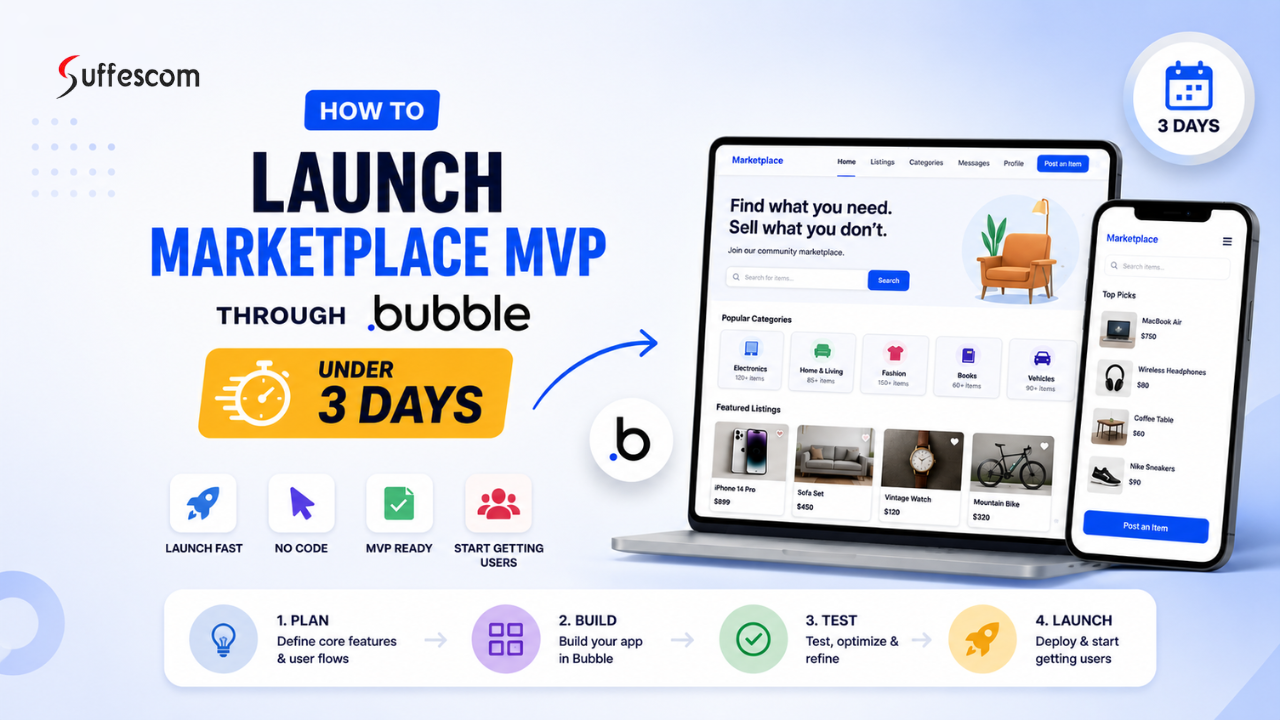
Before 2023, building a marketplace startup required months of development time, multiple engineers, and a huge budget. It’s now possible for entrepreneurs to develop and launch a working version of their marketplace MVP (Minimum Viable Product), using reliable no code tools such as Bubble, within just a couple of days.
At the beginning stages of launching your marketplace will be to determine how fast you can develop and launch out your service selective service marketplaces, rental platforms, B2B marketplaces, or reservations applications. Focus on getting initial users through quick development, versus spending thousands on custom development.
The MVP version of a marketplace will allow you to test your core idea before you make a large investment into advanced features. Bubble enables you to create user accounts, listing pages, payment pages, and workflows for users, as well as responsive application pages, all without having to build complex code.
Due to this approach, startups are now able to lower their risk of being able to enter their markets quickly by shortening the length of development and it ultimately allows them to significantly reduce the time they take to enter into the market.
Why Marketplace Startups Need Fast MVPs
Creating a startup in the marketplace space can be very competitive. The sooner you develop and release an MVP, the sooner you will start to discover what actually resonates with your users. As a result, many founders waste time and money building out features while they try to figure out if there will be demand for them, and ultimately fail.
Validate the Idea Before Heavy Investment
Some of the benefits of the MVP process include validating your idea before you invest too heavily into product development. Instead of spending months building a full custom software solution, you can determine if there are buyers and sellers interested in using your marketplace.
For example, if you are trying to develop a local services marketplace or a freelance marketplace, you will first need to validate:
- Are people searching for the services?
- Are sellers willing to join the marketplace?
- Will anyone be willing to pay?
By launching a simple MVP, you will be able to gather valuable feedback from the real world before launching into a larger scale with your marketplace.
Building a marketplace startup is highly competitive. The faster you launch, the quicker you can learn what users actually want. Many founders fail because they spend too much time and money building features before validating demand.
A fast MVP allows startups to focus on solving one core problem while reducing unnecessary development costs.
Acquire First Users Quickly
User acquisition is most effective when there is good supply and demand. Therefore, the faster a marketplace gets launched the sooner it can:
– attract early buyers,
– start building a community,
– test the onboarding experience,
– enhance the user experience.
Starting with a basic version of your marketplace can often provide enough traction.
Test Demand and Pricing
Founders may think that buyers will pay for premium listings/subscriptions/commissions without adequately testing price models.
With an MVP you can answer questions like:
– What is the optimal commission % to charge?
– Will sellers pay for premium listings?
– Would users rather pay for a subscription or just a one-time listing?
– Which categories are getting the most responses?
Testing these factors early and often can help reduce long-term business risk.
Reduce Development Costs
Marketplace development typically costs thousands of pounds and takes many months to complete. Therefore, using developers, designers, and project managers can become too expensive for startups that are still being formed.
Founders who use a no-code marketplace for MVP will see reduced costs because they can:
-Complete projects faster
-Use fewer large engineering teams
-Implement changes without needing to do any coding
-Test features more rapidly
Because of these advantages, MVP development through a no-code solution is an excellent option for bootstrapped or single-founders.
Why Bubble Is Perfect for Marketplace MVP Development
Bubble has emerged as one of the premier no-code platforms used to create marketplace applications. Founders can leverage the functionality of Bubble to produce fully functioning web apps without having to engage in traditional programming.
For startups seeking to create a market–entry MVP quickly and with flexibility, Bubble provides an ideal starting point for development of a marketplace.
No-Code Platform
Bubble was developed to be accessible to non-technical founders and startups. Users may develop their application by combining drag-and-drop components with visual workflow elements, rather than developing backend code linearly.
This means you can:
-Build visual pages
-Easily manage their database
-Automate certain functions
-Quickly deploy and launch their application
Faster Than Traditional Development
Normally it would take several months to build a complete custom online marketplace – however by using Bubble, the development period can be greatly reduced as the application infrastructure has all of the fundamental components already built into the platform.
Features like:
- user authentication
- database management
- workflows
- responsive design
- integrations
This means these features can all be set up significantly faster than the traditional approach of coding these out from scratch.
This speed of delivery can help new businesses get their marketplace MVP (minimum viable product) up and running within 3 days!
Built-In Database and Workflows
Every Bubble account comes with a fully functional, built-in database to manage things such as:
- users
- listings
- payments
- reviews
- messages
- bookings
The workflow automation feature enables you to create automatic actions such as:
- user signups
- listing approvals
- email notifications
- checkout flows
This reduces or eliminates the need for additional backend solutions to support your MVP.
Easy Integrations
Many new marketplaces need to be connected with third-party services for things like payment processing, analytics, email and automation. Bubble provides plugins to work with some of the most widely used tools including:
Scalable for Early-Stage Startups
Bubble is great for early stage startup founders to utilize when wanting to validate a startup idea and for early growth stages of a startup. Many founders have used Bubble to do the following:
- Test product-market fit
- Acquire initial users
- Launch beta versions
- Attract investors
Once a marketplace has begun to gain traction, it is able to continue scaling by using improved workflows, optimised databases and advanced integrations on the platform.
Bubble provides a balance between speed, affordability and function for many startups in the MVP stage.
Developers would take months of work with large dev teams and budgets to create a marketplace startup previously. Now founders can create and launch a functional marketplace MVP in only a few days using no-code tools like Bubble.
The importance of speed during the early stages of creating a marketplace startup is crucial whether you are launching a service marketplace, rental platform, B2B marketplace or a booking application. Instead of spending thousands of dollars on custom builds; startups now focus on validating their idea quickly; getting early users and improving their product through real feedback.
Many startups in the United Kingdom are adopting this strategy because it reduces risk, reduces the time required for development, and increases the speed of the time to revenue.
Ready to Build Your Marketplace MVP with Bubble in Just 3 Days?
Marketplace MVP Definition With Example
A good example will help illustrate a marketplace MVP.
If you were going to create a local marketplace for home cleaning called “CleanConnect,“ your concept is straightforward as your goal is to connect two parties together through an online platform:
The idea is simple:
- homeowners need cleaners
- cleaners want customers
- your platform connects both sides
With the above example, rather than build a fully–featured web application (with advanced AI integration, mobile applications, dozens of features), you would start with a simple MVP (minimum viable product) first to test your marketplace.
Buyer and Seller Interaction
In this example the buyers are homeowners, while the sellers are cleaners. The platform allows:
- homeowners are the buyers
- cleaners are the sellers
The platform allows:
- cleaners to create profiles
- buyers to search for cleaners
- users to connect through the platform
For example: Sarah is looking for a cleaner in London, she will go to your website and enter her search criteria to find cleaners in her area, after which she will see a list of cleaning service providers with their associated profiles and pricing.
At the same time, James provides cleaning services and is registering on the platform in order to be listed as an available cleaning service provider.
This is the primary interaction between a buyer and a seller that a marketplace must establish.
Listings, Services, or Products
The seller‘s published items on the platform are referred to as their listings.
- service title
- hourly price
- location
- photos
- service description
- availability
Example listing:
| Field | Example |
| Service | Home Cleaning |
| Price | £20/hour |
| Location | Manchester |
| Rating | 4.8 stars |
| Availability | Weekdays |
Buyers need to be able to compare services from different providers, and these listings provide exactly the information they require.
Product marketplaces, on the other hand, will list physical products instead of service providers.
Payments
Most marketplace MVPs have a simple payment functionality which facilitates on–platform payments between users.
For example:
- Sarah books a cleaner for £60
- payment is processed online
- the platform keeps a 10% commission
- the cleaner receives the remaining amount
Many startups use Stripe for secure online transactions because it integrates well with Bubble applications.
This allows founders to test:
- pricing models
- commissions
- subscription plans
- customer spending behaviour
without building an elaborate payment system.
Messaging or Booking Features
Messaging is an important part of every marketplace.
In this case, Sarah will want to:
- ask questions before booking
- confirm cleaning time
- discuss special requirements
The platform should offer:
- direct messaging
- booking requests
- appointment scheduling
- automated notifications
For example:
- Sarah selects a cleaner
- She chooses a booking date
- The cleaner confirms availability
- Both receive notifications
Why Startups Build Marketplace MVPs First
In order to reduce business risk and gather real user feedback before making a large investment, many startups develop a marketplace MVP (minimum viable product) first. A full marketplace can take several months to get off the ground and costs a lot of money to build, while many startup founders try to pack too many features in their initial release, making it difficult to truly understand what end users want.
By developing a startup‘s core functionality first, founders can iteratively improve their marketplace after they have received user feedback.
Launch Faster
A speedy launch is critical for most startups. The faster your marketplace is launched, the sooner you can attract users, collect feedback and improve your product.
For example: Rather than taking 6 months to build a full–featured marketplace with:
- advanced analytics
- AI solutions
- mobile applications
- automation systems
a startup can quickly get up and running with a simple MVP in just a few days using Bubble.
Being able to launch quickly can help your startup get to market faster and build traction sooner.
Test Real Demand
Developing a marketplace MVP allows entrepreneurs to test the following:
– Whether there are buyers that will use the marketplace
– Whether there are sellers who would like to be part of the marketplace
– Whether users will pay for using the marketplace
– Whether there is a true market demand for the marketplace niche.
For example, if you are developing a online marketplace for freelance trainers in fitness, you need to determine that there are:
- coaches are willing to create listings
- customers are searching for trainers
- people will book sessions online
Testing market demand early in the development process will help entrepreneurs avoid spending time and money developing an idea without market viability.
Reduce Development Costs
The cost of developing a traditional online marketplace was substantial. The cost of hiring mobile app developers, designers, and back–end developers is over a thousand dollars per hour in the UK and will be spent before the online marketplace has launched.
By using a no-code marketplace MVP, the entrepreneur can:
– Create visually without any coding
– Use preconfigured workflows
– Integrate tools quickly
– Make changes quickly
This means that developing an MVP using no–code tools is ideal for:
– Bootstrap entrepreneurs
– Solo entrepreneurs
– Small startup teams
– Early stage businesses
Using no–code building platforms such as Bubble, entrepreneurs will have the ability to validate ideas with limited initial investment.
Improve Features Gradually
An MVP or minimum viable product is NOT designed to be perfect. It is designed to be enhanced over time based on user interaction and recommendations.
Once users begin to interact with the site, the entrepreneur will be able to track:
– What features are used most frequently by the user base
– What features cause the user base to exit the site
– What issues the user base is experiencing
– What features need to be improved
For example:
- users may request better search filters
- sellers may want booking calendars
- buyers may prefer instant messaging
Startups use real data to refine their platform over time, rather than guessing what users want or need.
Avoid Building Unnecessary Functionality
A common mistake for many founders is to create more features than they need before actually launching. They’ll waste valuable time developing features that will never be used by a customer.
A marketplace MVP is great for keeping startups focused on essential features that every marketplace needs like:
- user accounts
- listings
- payments
- messaging
- bookings
Using this approach to building a marketplace will keep the development easy and simple, especially during the initial stages of a startup when the business model is still being developed.
For example, a local services marketplace does not need:
- AI recommendations
- advanced workflow automation
- custom mobile apps
- complex dashboards
during the initial launch stage of the business.
Rather than spending the next six months developing a large product, creators can launch a fully operational marketplace in a couple of days utilizing low/no-code tools like Bubble and start validating their business idea.
Types of Marketplace MVPs You Can Build on Bubble
| Marketplace Type | Example |
| Service marketplace | Freelancers, home services |
| Product marketplace | Handmade goods, resale |
| Rental marketplace | Cars, equipment |
| Booking marketplace | Coaches, salons |
| B2B marketplace | Agencies, suppliers |
What You Need Before Building
Focusing on technology only won’t help build a successful marketplace. You will need a way to help users solve problems.
Before starting to use Bubble to create your own marketplace, you should:
- define your niche clearly
- validate the market demand
- research competitors
- choose the right no-code tools
- understand your users’ problems
Creating time ahead of time will help save you money and labour, both now and in the future.
Define Your Marketplace Niche
The first step in creating the MVP of your marketplace is to define your niche. Your niche allows your company to place an emphasis on a specific customer instead of trying to please everyone.
A lot of successful marketplaces started out in small markets and eventually expanded to larger markets.
For example:
- a local cleaning marketplace targets homeowners
- a coaching marketplace targets professionals
- a rental marketplace targets short-term users
- a digital products marketplace targets creators
By defining a niche, it is much easier to:
- attract early users
- market your platform
- understand customer needs
- improve product-market fit
The marketplaces listed below are some typical marketplaces that start–ups utilize Bubble to be built.
| Marketplace Niche | Example |
| Local services | Cleaning, plumbing, repairs |
| Coaching | Fitness, business, career coaching |
| Rentals | Cars, bikes, equipment |
| Digital products | Templates, ebooks, courses |
Local Services Marketplace
Examples include:
- electricians
- cleaners
- plumbers
- photographers
The reason this type of online marketplace is effective is that users are regularly looking for trusted local professionals.
Coaching Marketplace
A coaching marketplace allows coaches/trainer to offer sessions online.
Examples include:
- fitness coaching
- career mentoring
- business consulting
- language tutoring
These platform typically provide:
- booking systems
- video call integrations
- subscription plans
Rental Marketplace
Rental marketplaces allow users to rent goods/services on a temporary basis.
A few examples of this are:
- car rentals
- camera rentals
- holiday equipment
- office spaces
The idea behind this model is that customers prefer to have temporary access rather than full ownership.
Digital Products Marketplace
The digital product marketplace enables a creator to sell physical downloads over the Internet.
Examples include:
- templates
- online courses
- design assets
- ebooks
Digital products are attractive because they have minimal delivery costs and they are easily scalable.
Launch a Marketplace Without Coding Using Bubble
Start building your Bubble marketplace MVP today and bring your idea to life in record time.
Validate the Problem First
Before proceeding with building your marketplace application; you must validate that there is a real need for the solution you will provide via your application. This is called market validation.
Many founders skip this step and begin developing too early causing them to create a platform that never gets used.
By validating the problem, you can identify:
- customer pain points
- existing competition
- pricing expectations
- market demand
Reddit Research
Test your marketplace idea using Reddit – you can learn from real customer discussions and complaints.
Use the following keywords when searching for existing marketplace problems:
- complaints about existing platforms
- feature requests
- industry-specific discussions
- unmet customer needs
For example, if you find that users constantly complain about the high price of using freelance service providers, you may also find an opportunity to create a niche marketplace startup.
Facebook Groups
Things that you can do using Facebook Groups include:
You can:
- ask questions
- observe common problems
- understand customer language
- test interest in your idea
This is especially useful for local marketplaces and service-based businesses.
Competitor Reviews
Reading competitor reviews helps identify weaknesses in existing platforms.
Look at:
- Trustpilot reviews
- Google reviews
- App reviews
- Reddit discussions
Pay attention to:
- common complaints
- missing features
- pricing concerns
- poor user experiences
This information can help improve your marketplace MVP strategy.
Surveys
By utilizing simple surveys, you can quickly gain confirmation that your business idea is valid by asking prospective users questions such as:
- Would you use this platform?
- What problems do you face?
- How much would you pay?
- Which features matter most?
Providing a survey provides you with valuable feedback before you begin development of your product.
Waitlists
Creating a waitlist to test market interest prior to your launch can be accomplished simply. Start by creating a simple landing page that describes:
- your marketplace idea
- the problem you solve
- benefits for users
On the landing page include a call to action encouraging visitors to register as part of a waitlist.
Essential Tools Required
Building a marketplace MVP becomes much easier when using the right tools. No-code platforms and automation tools help startups launch faster while reducing development costs.
Below are some essential tools commonly used for marketplace MVP development.
| Tool | Purpose |
| Bubble | App builder |
| Stripe | Payments |
| Figma | UI wireframes |
| Google Analytics | Tracking |
| Mailchimp | Email marketing |
Bubble — App Builder
Bubble is a popular no-code platform used to build marketplace websites and web applications without coding.
It allows startups to create:
- databases
- workflows
- user dashboards
- listings
- payment systems
Bubble is ideal for launching marketplace MVPs quickly.
Stripe — Payments
Stripe helps marketplaces process secure online payments.
It supports:
- one-time payments
- subscriptions
- marketplace commissions
- seller payouts
Many Bubble marketplace apps use Stripe because the integration process is simple.
Figma — UI Wireframes
Figma helps founders design the marketplace layout before development starts.
Using wireframes helps:
- organise page structure
- improve user experience
- simplify development planning
Good UI planning reduces mistakes during the build stage.
Google Analytics — Tracking
Google Analytics helps startups understand how users interact with the marketplace.
It tracks:
- website traffic
- signups
- user behaviour
- conversions
- drop-off points
This data helps improve the marketplace after launch.
Mailchimp — Email Marketing
Mailchimp is useful for:
- onboarding emails
- newsletters
- user updates
- marketing campaigns
Email marketing is important for growing early-stage marketplace platforms and retaining users after launch.
3-Day Marketplace MVP Launch Plan
Building a marketplace MVP is about moving fast and staying focused not getting everything right. The goal is to get a working product out so you can try it out with real users and make it better based on what they say. With tools, like no-code platforms you can. Launch a marketplace in just a few days without needing to write any code.
The main idea here is pretty straightforward. You only build whats needed for buyers and sellers to meet make trades and talk to each other. Everything else can be added later.
Day 1 — Design and Core Marketplace Setup
Create the Bubble Project
On the day you start by making your app, inside Bubble. You pick a marketplace name and begin a new project. Some people like to start with a setup so they can make everything just the way they want it while other people choose a template that works on different screens to save time.
A template is helpful because it already has layouts that work on mobile and desktop screens. This helps you think about what your app can do of spending too much time on how it looks.
Setup Database Structure
When the project is ready you have to set up the database. The database is the part of your marketplace because it keeps all the important information.
In a marketplace users will have things like their name, email address and what they do. Listings will have details like what the item’s called how much it costs, pictures and what it is about. Orders will keep track of when someone buys something from someone. Messages will let users talk to each other and reviews will keep track of how good or bad something’s what people think.
For example let us say you are making a marketplace for cleaning services. A cleaner signs up. Makes a listing that says how much they charge per hour and what they can do. A customer books that cleaner, which makes an order in the system. After the cleaner is done the customer says what they thought of the service. The database stores all of this information about the marketplace, including the cleaner, the customer, the listings the orders and the reviews. The database is very important for the marketplace because it keeps all the information, about the listings the orders and the reviews.
Build Core Pages
After the database is ready you start building the pages of your marketplace.
The homepage is where users first land. It should clearly explain what the marketplace does and what problem it solves for users. The signup and login pages let users create accounts and get into the system.
The listing page shows all services or products in one place. The seller profile page gives info about each service provider. The dashboard lets users manage their activity like bookings, listings or messages. The checkout page handles payments when a transaction happens.
At this stage the focus is, on making sure the system works. You want users to easily move through the platform. A perfect design is not the goal here.
Create User Roles
Every marketplace needs kinds of people using it. The buyers are the people who look for things they want to buy. The sellers are the people who sell things on the marketplace. The admins are the people who make sure the marketplace works correctly and fix any problems that come up.
For example in a marketplace where people can hire freelancers a buyer might want to hire a designer to do some work for them. The designer is like a seller because they make a listing that says what work they can do and how much they charge. Then the buyer can place an order with the designer. The admin is like a helper who makes sure everything goes smoothly and steps in if there are any issues, with the order or the listing.
Design Responsive UI
The last step on Day 1 is to ensure the platform works on all devices, especially mobile phones. Most users will access your marketplace from their phones so the design must be simple and clean.
A good marketplace design should load quickly. It should use text. Navigation should be easy. Buttons should be simple and obvious. This way users know what to do next. Images should be optimised. This way the platform does not become slow.
At this point you are not building a product. You are building a structure. This structure can be tested with users.
By the end of Day 1 your marketplace should have a working foundation. Users can sign up. They can view listings. They can understand how the platform operates. This sets the base, for adding payments. You can add messaging. You can add marketplace functionality in the next stages.
Day 2 — Workflows, Payments, and Marketplace Features
On the day the focus moves from structure to real functionality. This is the stage where your marketplace Minimum Viable Product starts behaving like a product rather than just a static design. You begin adding logic and automation and user interactions so buyers and sellers can actually use the marketplace. Using a platform like Bubble you can create all these features through workflows without writing backend code.
Setup User Authentication
User authentication is the foundation of any marketplace because it controls how users access the marketplace and what they are allowed to do on the marketplace. At this stage you enable email login so users can register with their email address and password on the marketplace. This is the common and simple method for early-stage marketplace Minimum Viable Products.
You can also add Google login to make sign-up more convenient for users of the marketplace. This is especially useful for users who prefer quick access to the marketplace without creating a new password. Password reset functionality is also important for the marketplace because users of the marketplace often forget their login details. A secure reset system allows them to receive an email link and create a password easily for the marketplace.
For example in a freelance marketplace a designer can sign up using Google in seconds. Immediately start exploring the freelance marketplace without any complicated setup, for the freelance marketplace.
Build Listing Submission Workflow
The listing submission workflow is what helps sellers put their services or products on the marketplace. This is an important part of getting a marketplace up and running because without listings people have nothing to look at.
So how does it work? A seller logs in. Fills out a form. They add things like a title, a description, how much it costs some pictures and what category it fits into. Once they submit the form all that information gets. The listing shows up on the marketplace.
For example if you have a marketplace for cleaning services a cleaner can make a listing that says what they do upload some pictures of their work and set a price per hour. Soon as they publish it the listing shows up in search results for people who might want to hire them.
This way the marketplace always has stuff on it without anyone having to do it by hand.
Integrate Payment Gateway
Payments are a deal for marketplaces because they make it possible for buyers and sellers to actually exchange money. A lot of companies use Stripe because it is safe and easy to use with Bubble.
There are ways to handle payments depending on what kind of marketplace you have. Sometimes people pay once for something. Times the marketplace takes a cut of each sale. There are also ways to split payments automatically so the seller gets their share. The platform gets its share. Some marketplaces even hold onto the money until the job is done, which helps build trust.
For example if you have a marketplace, for coaches someone might pay fifty pounds for a session. Stripe handles the payment the platform takes a fee and the rest goes to the coach.
Add Marketplace Search and Filters
The search and filters are really important because they help people find what they are looking for quickly. If the search does not work well people may leave the platform because they have a time finding what they need.
A good marketplace lets people search using keywords and also filter the results based on things like price, category, location and ratings. These filters make it easier for people to compare options and make good choices.
For example if someone is looking for a camera to rent they can use the Marketplace Search and Filters to show cameras that cost less than £50 per day in their city and have good ratings. This makes the whole experience better for the user. Helps more people make purchases.
Setup Messaging System
The Messaging System is important because it lets buyers and sellers talk to each other directly on the platform. This helps build trust and reduces confusion before people make a purchase.
In Bubble you can set up the Messaging System using the built-in workflows, plugins or email notifications. The built-in workflows let you create a chat system where people can send and receive messages in real time. The plugins can add advanced chat features if you need them and the email notifications help people know when they get a new message.
For example in a tutoring marketplace a student might use the Messaging System to ask a tutor about their schedule before booking a lesson. The tutor can respond on the platform. Both people can stay connected without leaving the Marketplace.
Build Admin Dashboard
The Admin Dashboard is used to manage the marketplace and make sure everything runs smoothly. It gives the person in charge control over the users, listings and transactions.
The admins can review listings before they are posted which helps keep the quality high and prevents spam content. They can also remove listings that are not allowed or suspend users who break the rules.
Managing the users is also important because it lets the admins monitor what is happening and help the users when they need it. Keeping track of payments is also crucial because it helps the person in charge understand how much money is being made, what the commissions are and what transactions have happened.
For example if someone posts a listing that’s not honest the admin can review it and remove it to keep the trust of the people using the platform.
By the end of Day 2 the Marketplace is fully working. People can sign up create listings search for things talk to each other and make payments. This is when the platform starts to feel like a marketplace rather, than just a test version.
Day 3 — Testing, SEO, and Launch
On the day the focus is on making sure your marketplace is stable, discoverable and ready for real users. This is the stage before launch, where you test everything improve search visibility connect your domain and introduce the marketplace to early users. By this point your marketplace should already be functional so the goal is to refine and release it confidently.
Test the Entire Marketplace Flow
Before launching you need to test the user journey from start to finish. This means checking how a real user would interact with your marketplace from signing up to completing a transaction. Your marketplace needs to work. For example a new user should be able to register create or browse listings make a booking or purchase and receive confirmation without any errors. If any part of this flow breaks users will drop off quickly so testing is extremely important.
You can test each function one by one. Confirm that it works as expected. You check whether signup works properly whether listings can be created and displayed correctly whether payments go through successfully and whether users receive notifications. You also test how the marketplace behaves on devices because most users will access your marketplace from their phones.
A basic testing checklist looks like this:
| Test Area | Status |
| User signup | Working / Not working |
| Listing creation | Working / Not working |
| Payment flow | Working / Not working |
| Mobile responsiveness | Working / Not working |
| Notifications | Working / Not working |
| Checkout | Working / Not working |
This step ensures that your marketplace is stable before real users start using it. Your marketplace needs to be stable.
Optimize Marketplace SEO
Search engine optimization is important because it helps your marketplace appear on Google when people search for services or products. Good search engine optimization can bring traffic without spending money on ads. Your marketplace needs to appear on Google.
At this stage you focus on making your marketplace pages easy for search engines to understand. This includes improving titles, URLs, images, meta descriptions and page structure. Search engine optimization is not about ranking but also about improving click-through rates and user experience. Your marketplace needs to be easy to understand.
For example if you are building a freelance marketplace you want your pages to appear when someone searches for “hire freelancers in London” or “online tutoring marketplace”. Your freelance marketplace needs to appear on Google.
On-Page SEO Checklist
On-page SEO refers to optimising elements directly on your website so search engines can understand your content better.
| SEO Element | Best Practice |
| Title tags | Include relevant keywords naturally |
| URLs | Keep them short, clean, and readable |
| Images | Compress and optimise for faster loading |
| Meta descriptions | Write clear, click-focused summaries |
| Headings | Use proper H1, H2, H3 structure |
For example of a messy URL like “/page123?id=45” you should use something clean like “/cleaning-services-london”. This makes your marketplace more search engine optimization-friendly and easier to rank. Your marketplace needs to be easy to rank.
Connect Custom Domain
Connecting a custom domain makes your marketplace look more professional and trustworthy. Of using a default URL you can use your own branded domain name. Your marketplace needs to look professional.
For example of “yourapp.bubbleapps.io” you can use something like “yourmarketplace.com”. This builds credibility. Improves branding, especially when attracting users and investors. Your marketplace needs to have a custom domain.
Add Analytics and Tracking
Analytics is really important for your marketplace. It helps you see how people are using your site. You can find out what is working and what is not working. Your marketplace really needs analytics to do well.
A lot of companies use Google Analytics to see what people are doing on their site. When you set it up you can see how many people visit your site, where they are coming from and what they are doing on your pages. You should pay attention to things like when people sign up when they buy something when they stop using your site and when they add listings. For example if a lot of people visit your homepage but do not sign up it might mean that there is a problem, with the way you are telling people about your site or the way it looks.
Analytics helps you make decisions after you launch your site instead of just guessing what people want. Analytics is something your marketplace needs to make decisions. Your marketplace needs analytics to know what to do.
Soft Launch Your MVP
A soft launch means releasing your marketplace to an audience before going fully public. This helps you test user behaviour without pressure and gather early feedback. Your marketplace needs a launch.
You can start by sharing your marketplace in founder communities LinkedIn posts, niche Facebook groups or relevant online forums. These early users are usually more willing to provide feedback and help improve your platform. Your marketplace needs feedback.
Platforms like Product Hunt are also useful for launching your marketplace to an audience of early adopters and startup enthusiasts. You can also use outreach by contacting potential users directly through email or social media. This works well for niche marketplaces where you already know your target audience.
For example if you built a coaching marketplace you could reach out to fitness trainers or business coaches. Invite them to join your marketplace early. Your coaching marketplace needs a launch.
By the end of Day 3 your marketplace is fully tested, search-optimized and ready for users. At this stage you are no longer just building. You are officially. Validating your startup idea in the real world. Your marketplace is ready, for launch.
Ready to Launch Your App in 3-Day Marketplace MVP Plan
Essential Marketplace Features for MVP Success
| Feature | Priority |
| User accounts | High |
| Listings | High |
| Payments | High |
| Search | High |
| Reviews | Medium |
| Messaging | Medium |
| Notifications | Medium |
| AI recommendations | Low |
Common Mistakes When Building a Bubble Marketplace
When you are building a marketplace on Bubble, a lot of people rush into it and make mistakes that can be avoided. These mistakes do not cause problems away when you are developing the marketplace but they become big issues when real users start using the platform. If you understand these mistakes on you can build a cleaner marketplace that is easier to scale and has fewer problems later on.
Overbuilding the MVP
One mistake people make is trying to add too many features at the beginning. The people who are building the marketplace often want it to be perfect before they launch it so they add things like dashboards and complex filters that are not really needed at this stage.
The problem is that this slows down development and makes the platform harder to manage. For example, a founder building a simple freelance marketplace might spend weeks adding referral systems and advanced analytics, even though users only need listings, search, and payments at the start.
It is better to focus on the basic things like user signup, listings, search and payments. You can add everything later once you know people want it.
Ignoring Mobile Users
A database that is not well organized is a technical problem when you are building a marketplace. Since Bubble apps rely heavily on the database a bad design can cause the marketplace to be slow and have workflow problems on.
For example if you do not keep users listings orders and messages separate your system can become confusing and hard to scale. A common mistake is putting much information in one place instead of making sure the different types of data are related to each other in a clean way.
This can cause problems, like search results, broken workflows and trouble adding new features later on. If you design the database well you can make sure the marketplace is scalable and easy to manage as it grows.
Poor Database Design
A planned database is a major problem when you are building a marketplace. This is because Bubble apps need a database to work properly. If the database is not structured well it can cause the marketplace to be slow and have problems with its workflow.
For example if you do not keep users listings orders and messages separate the system can become very confusing and hard to make bigger. A common error is putting much information in one place instead of making sure the different types of data are connected in a clean way.
This can cause problems like search results, broken workflows and trouble adding new features later on. A clean database design means your marketplace can grow and still be easy to manage.
Skipping User Validation
A lot of people who start companies build a marketplace without checking if people really want it. This is a mistake when you are starting a company. If there is no demand for the marketplace it will fail even if it is built well.
For example someone might spend months building a marketplace for tutors without checking if tutors want to join or if students are willing to pay. After it is launched they might find out that not many people are interested.
You should always check if people want your marketplace before you build it. You can use landing pages, surveys, Reddit discussions, Facebook groups or simple waitlists to see if people are interested. This helps you figure out if your idea solves a problem before you spend a lot of time building it.
If you do not check if people want your marketplace you might waste a lot of time and money which’s what you are trying to avoid when you build a marketplace.
By not making these mistakes you have a better chance of building a successful marketplace that can grow. A simple marketplace that people want and has a database is better, than a complicated one that nobody wants.
How Much Does It Cost to Build a Marketplace MVP on Bubble?
Building a marketplace viable product using Bubble is a lot cheaper, than doing it the traditional way. This is because you do not have to hire a team of engineers or build everything from the ground up.
You are using a platform that does not need code and already has a lot of the parts in place like databases and hosting and workflows.
The total cost of building an app for a marketplace viable product depends on how basic or complicated your marketplace is.. For most startups that are just starting out the cost of building a marketplace minimum viable product stays pretty low and you can predict what it will be.
Bubble Plan Cost
The biggest cost that people have to pay all the time is the Bubble subscription plan. Bubble has plans that cost different amounts of money depending on how much you use the app and how much data you need to store and so on.
Most people who are just starting out with a marketplace usually choose a basic plan or a mid-level plan that costs somewhere between 29 dollars and 119 dollars every month.
For example if you have a marketplace where people can find freelancers and it does not have a lot of users you can get away with a cheaper plan.. If you have a bigger marketplace where people can book things and it has a lot of traffic you will need a more expensive Bubble subscription plan so that it can handle all the traffic and work properly.
This cost pays for a lot of things, like hosting and managing the database and making sure everything runs smoothly which’s something that you would normally have to set up yourself with your own servers and backend if you were not using Bubble.
Domain Cost
A custom domain is really important for making your website look good and for people to trust it. You can get your domain name, like “yourmarketplace.com” instead of using the default Bubble website address.
It usually costs around ten to twenty dollars every year. The price depends on who you buy it from and what kind of domain you want.
Lets say you have a website for cleaning services called “CleanConnect”. It looks a lot better when you use a custom domain name. It is a thing to pay for but it helps people think your website is good and it also helps with search engines finding your website. A custom domain is a thing to have for your website, like “CleanConnect” because it makes your website look more professional and it helps with search engines.
Stripe Fees
If you have a marketplace where people can buy things you will need a way to handle payments, like Stripe.
Stripe does not ask you to pay a fixed amount of money every month. What they do is take a bit of money from each payment that goes through. So the amount you pay to Stripe depends on how money your marketplace makes.
For example let us say someone books a service that costs £100. In this case Stripe will take a fee from that £100 before giving the rest of the money to you. This way of doing things is really good, for businesses because you only have to pay Stripe when your marketplace actually makes some money.
Plugin Costs
Bubble has plugins that add new features. Some plugins are free while others you have to pay for depending on what they do.
Paid plugins often include things like search, chat systems, booking calendars or connecting to other apps through APIs. Most startups spend between $0 and $100 on these during the stages.
For Example, a website for renting things might use a calendar plugin to keep track of when items are available. On the hand a website that connects people, for services might use a messaging plugin so users can talk to each other.
Template Costs
Templates are not required,. They can really help you get started quickly. Bubble has. Free and paid templates in its marketplace. These templates already have pages and workflows set up for you.
Paid templates can cost anywhere from nothing to a hundred dollars. The price depends on how complex they’re. These templates often come with things like user dashboards, pages for listing things and payment systems in place.
For instance if you want to build a marketplace, for freelancers you can start with a template thats already built. Then you can make changes to fit your needs. This approach saves you a lot of time. Helps you launch your project faster.
Final Cost Summary
Building a marketplace MVP on Bubble is really affordable. You can get a working version up. Running with just a small monthly fee, a domain name and a few extra plugins.
This is great for startups that want to try out their marketplace idea without spending a lot of money. Bubble is an option because you can launch something quickly and see how it goes, instead of paying a lot of money upfront, for development. You can test your marketplace idea on Bubble. It will not cost you thousands of pounds.
| Expense | Estimated Cost |
| Bubble plan | $29–$119/month |
| Domain | $10–$20/year |
| Stripe fees | Transaction-based |
| Plugins | $0–$100 |
| Templates | Optional |
Bubble Marketplace MVP vs Traditional Development
Building a marketplace with Bubble is really fast. Does not cost a lot of money. This is because Bubble lets people who start companies make a working marketplace without having to write code. They can use tools to make the database, workflows and user interface. This means you can launch a marketplace in a few days instead of waiting for months. This is great for testing your ideas
The other way to do it is with development. This is when you have to hire people who can write code and they have to make the thing from nothing. They have to write the code for the backend and build everything, which takes a lot of time and money.. If you want to make something really big and complicated traditional development is better. It is more flexible. You can make it bigger if you need to. Bubble is great, for making a version of your marketplace to see if it is a good idea.. If you want to make a really big platform it is better to write the code yourself.
| Factor | Bubble (No-code) | Traditional Coding |
|---|---|---|
| Development speed | Very fast | Slow |
| Cost | Low | High |
| Maintenance | Easy | Complex |
| MVP launch time | Days | Months |
| Scalability | Moderate | High |
Best Bubble Plugins for Marketplace Apps
When you are creating a marketplace with a viable product on Bubble the plugins are really helpful. They give you features without you having to write custom code. This means you can build your marketplace faster and make it look more professional. You can add things like payments and bookings and even search functions. The plugins also help with automation.
Picking the plugins from the start can save you a lot of time when you are building your marketplace. This also makes it easier to make your marketplace bigger and better, on.
| Plugin | Purpose |
| Stripe plugin | Payments |
| Air Date/Time Picker | Booking |
| Zeroqode plugins | Marketplace features |
| Algolia | Advanced search |
| Toolbox | Custom scripts |
Scaling Your Marketplace After MVP Validation
When you have a marketplace up and running on Bubble and people are using it you stop worrying about getting it out and start thinking about making it work really well. At this point you know your idea is an one so you need to make it better get more people to use it and make sure it keeps working well over time.
Making your marketplace bigger is not about adding a lot of new things. It is, about fixing the problems that users are actually having and making the experience better based on what you have learned from them and the data you have collected about your marketplace and how people use it.
Improve UX Based on Feedback
The user experience is really important when people start using your marketplace. At this point you get feedback that shows you where people are having trouble and where they stop using it.
For example if people do not finish signing up it is probably because the process is too long or hard to understand. If sellers are not making listings it might be because the form to make a listing is confusing or does not have all the information. If buyers are not finishing their purchases the checkout process might need to be made simpler.
Making the user experience better means making the platform easier to use faster and more user friendly. Even small things like making the buttons clearer making the pages easier to look at and making the site load faster can make a difference in how much people use the site and how many sales you make. The user experience is what matters here so improving the user experience is key, to making your marketplace work better.
Add Automation
As your marketplace gets bigger it becomes really hard to keep up with all the tasks that need to be done. That is where automation comes in. It helps you deal with tasks without having to do everything by hand all the time.
Onboarding emails are really useful because they help new users figure out how to use the platform after they sign up. Reminders are also super helpful when users start doing something like booking a service or creating a listing. Then they do not finish it.. Abandoned checkout emails can actually help you get back money that you would have lost if the user had not come back to finish their purchase.
For example lets say a user adds a service to their checkout. Then they do not pay for it. An automated email can remind them to finish the booking, which can actually increase the number of sales you make without having to spend money on marketing.
You can set up these automations using Bubble workflows or connected email tools depending on how complicated your system’s
Hire Bubble Developers
Once your marketplace really starts to take off you might need some expert help to make it run better and add features. That is when it is an idea to hire experienced Bubble developers because they know how to make complex workflows and database structures work better.
There are teams of specialists like Suffescom Solutions, that can help startups make their Bubble applications better by making them faster fixing problems and adding features to the marketplace. They can also help you set up payment systems, automate workflows and make the user experience better for people.
For example if your marketplace starts to slow down because of much traffic or complicated workflows a Bubble expert can reorganize the app to make it run better and be more stable. This is really important for marketplaces, like yours because you want to make sure that everything runs smoothly especially when you have a lot of users.
Transition to Custom Code Later
Bubble works well for projects and early-stage marketplaces.. There comes a point where custom development is needed. This happens when your platform grows a lot and needs advanced features, deeper backend logic or highly custom features.
For example, if your marketplace gets thousands of users every day and needs complex systems that work in real-time or advanced connections to other services moving to custom code might be a better option.
However you should only make this change after you have tested your idea and have user interest. Many startups use Bubble for a time before switching because it helps them grow without spending too much on technical costs early on.
A good plan, for changing your platform ensures that user information, listings and workflows are moved safely without disrupting the business.
Build Faster, Iterate Smarter with Bubble
Keep evolving your marketplace while it’s already live, this is how fast-growing startups win with Bubble.
Conclusion
Building a marketplace MVP is about speed, validation and learning from real users. It’s not about creating a product from the start. Using a no-code platform like Bubble helps founders launch a working marketplace quickly. They don’t need a development team or complex technical setup. This makes it easy to test ideas in the market within days, not months.
The main thing to think about is validation first. Before you add a lot of things to your platform you need to make sure that people actually want to use it and will come back to it. A simple version of your platform with the basics like user accounts and payments is usually enough to see if people like it and how they use it.
If you keep this version lean you can avoid making things too complicated and you will not waste time building things that people do not use. A lot of startups start with something small and launch it quickly then they make it better based on what people tell them not just what they think.
When your platform is up and running what people tell you becomes the important thing to listen to. This is when you start to make changes and improve things, which helps you make the experience better fix problems and get more people to use your platform over time.
On, when you want your platform to get bigger or work better companies, like Suffescom Solutions can help you make your Bubble-based marketplace better and faster which makes it easier to go from a simple version to a more advanced one without slowing down.
FAQs
1. Can Bubble handle marketplace apps?
Yes Bubble can build marketplace apps. Bubble is good for creating marketplace apps with payments user accounts and workflows.
2. How long does it take to build a marketplace on Bubble?
It depends on what you want. If you keep it simple and focus on features you can launch a basic marketplace in 3 days.
3. Is Bubble good for scalable startups?
Bubble is great for early-stage startups. Can handle MVPs well.. If your platform gets really big you might need custom architecture.
4. How much does a Bubble marketplace MVP cost?
The cost of a marketplace MVP on Bubble can vary.. It is usually much cheaper than traditional development. Most MVPs can start from few hundred dollars.
5. Can I integrate Stripe with Bubble?
Yes you can use Stripe with Bubble. Bubble supports Stripe for payments, subscriptions and checkout workflows.
6. Do I need coding knowledge to use Bubble?
No you do not need to know how to code to use Bubble. It is designed for non-technical people to build applications visually.
7. What are the limitations of Bubble?
Bubble can have performance issues if it gets too big. You might need to make some changes or move to a system if it gets too complex.
8. Which marketplaces are best for Bubble MVPs?
Some marketplaces work well on Bubble. These include service marketplaces, booking platforms, rental platforms and niche community marketplaces.
9. Is Bubble good for building a marketplace in the UK?
Yes many people in the UK use Bubble to test their marketplace ideas. It saves time and money.
10. Can I build a freelance marketplace for the UK using Bubble?
Yes you can build a freelance marketplace in the UK with Bubble. Many people use Bubble for early-stage validation in the UK market.
11. How do I launch a marketplace MVP quickly in the UK?
To launch a marketplace MVP quickly in the UK focus on features use Bubbles no-code platform and integrate necessary tools, like Stripe for payments.
12. Is Bubble suitable for London-based startups?
Yes Bubble is really popular among startups in London because it lets them create prototypes fast without having to hire a lot of developers.
13. Can I make money with a Bubble marketplace app?
You can make money with a Bubble marketplace app in a lot of ways. For example you can charge people commissions, subscriptions, listing fees or take a cut of each transaction.
14. What is the easiest type of marketplace to build on Bubble?
If you want to build a marketplace on Bubble, the ones to make are probably service-based and booking marketplaces. This is because they are pretty simple and do not need a lot of workflows or integrations.
15. Can Bubble-built apps attract investors in the UK?
Yes investors in the UK will consider Bubble apps if they can see that people are using them and that they are solving a problem. They just need to see that your Bubble app is working and that people like it.
16. Can I migrate from Bubble later if my startup grows?
A lot of startups begin with Bubble. Then switch to something custom when they get bigger. This is because Bubble is great for getting started. You might need something more advanced later on.
17. How secure is a Bubble marketplace app?
Bubble is pretty secure. They have good hosting and authentication. However you still need to make sure you set everything up correctly so that you can handle payments and user data safely.
18. Is Bubble good for non-technical founders?
Bubble is really great for founders who’re not technical. It lets them build and launch a marketplace without needing to know how to code.
19. What is the fastest way to validate a marketplace idea?
The fastest way to see if your marketplace idea is a good one is to build a version of it on Bubble and then try it out with some real users. This will help you figure out if people really want what you are offering before you put in much time and money.
20. Do UK users trust Bubble-based marketplaces?
People, in the UK do not really care how a marketplace was made. What they care about is whether it is fast easy to use and if it solves their problem. They do not care if it was made with Bubble or something else.

Senior Content Strategist
Jonathan Raabe is the Content Strategist at Suffescom Solutions and has more than 7 years of experience in developing data-driven content strategies for technology-centric organizations. He is proficient in the areas of mobile app development, software development, AI, cloud computing, fintech, healthcare, and digital transformation. Jonathan collaborates with industry leaders, developers, and business heads in creating high-value, SEO-optimized content that helps companies in increasing their visibility on the search engines, establishing trust, and driving business inquiries.
Need Help With
Development?